

White background listing images have become the default visual standard in e-commerce. Whether you sell on marketplaces, run a D2C website, or manage a large catalogue, clean white backgrounds are no longer optional. They are the baseline expectation. Yet for many brands, especially early-stage teams and solo founders, white background images still feel tied to studio shoots, lighting setups, and expensive equipment.
That assumption is outdated. Today, creating clean, listing-ready white background images is less about photography gear and more about understanding the workflow. This article explains how to approach white-background listing images without a studio setup, and why Studio Shot is designed specifically for this use case.
Why White Background Listing Images Matter
White background images improve clarity and trust by removing distractions. Detailed, well-composed photos help customers understand what they’re buying and increase conversion rates.
Studies have repeatedly confirmed this: high-quality product photography can significantly improve conversion rates by building trust and reducing hesitation. Other data suggest that 50% of e-commerce shoppers prefer viewing product photos over reading descriptions, and that introducing better visual formats, such as 360-degree views, can increase add-to-cart rates by up to 35%.
These numbers highlight that visuals aren’t a “nice-to-have” — they directly influence customer behaviour. They also adapt well across use cases. The same image can live on a marketplace listing, a PDP hero section, a category grid, or a paid ad without breaking visual consistency. This scalability is why white background images remain the backbone of most e-commerce catalogues. Compelling product imagery is not optional if you want to compete online.
White Background and Listing Image Standards
White background images follow a set of practical rules that determine how products are displayed, cropped, and compared across e-commerce platforms. Understanding these standards upfront helps avoid common mistakes that make listings look inconsistent or unprofessional. The sections below break down what these standards actually mean in practice, from background treatment to framing and platform expectations, so you can apply them correctly at scale.
What “White Background” Really Means
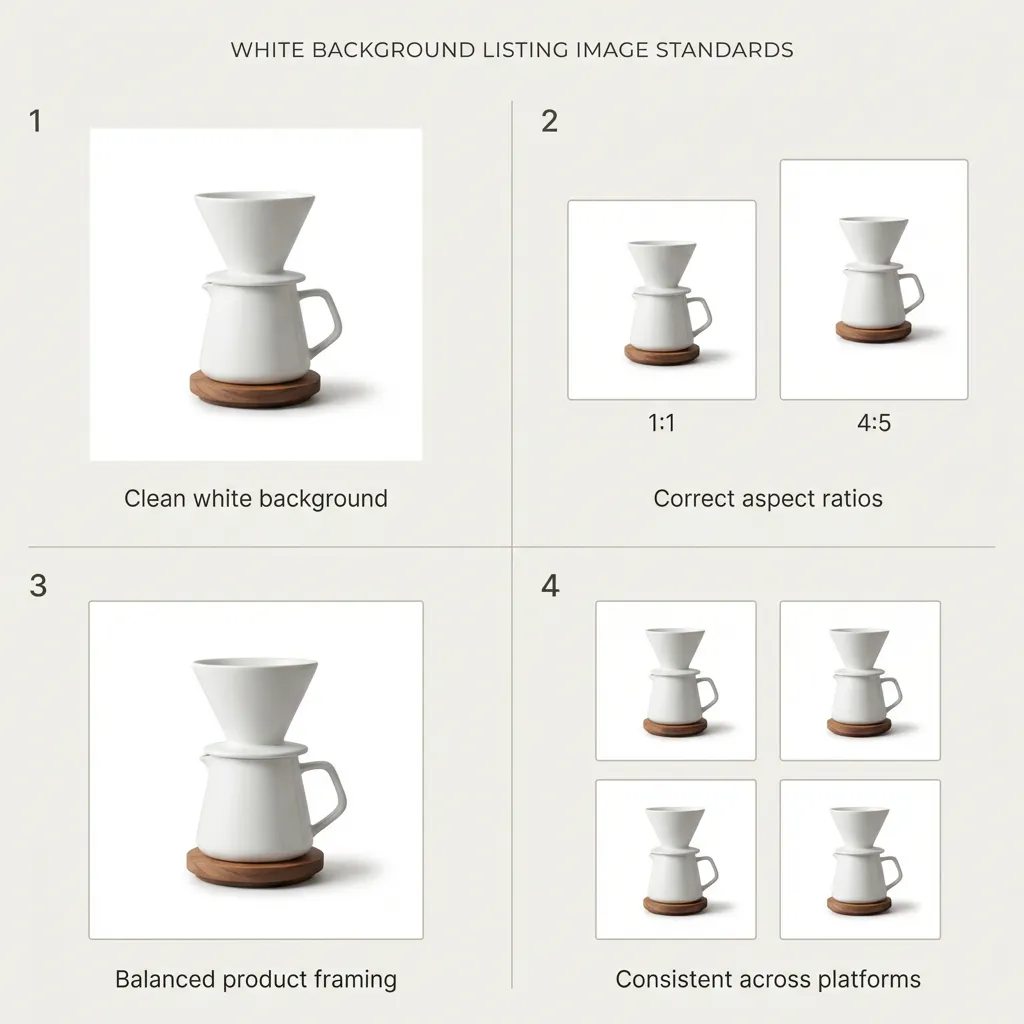
A white background image isn’t just any product photo placed on a light surface. Most e-commerce standards require a pure-white background, with no visible textures, patterns, or props that draw attention away from the product. Lighting is critical; colours must remain accurate and true to the real product, without harsh shadows or colour casts. Just as important is consistent framing across SKUs, so every product appears aligned and comparable within a catalogue.
This level of uniformity enables customers to quickly scan and compare products, especially on category pages and thumbnails, where dozens of items are displayed at once. When images follow the same visual rules, the catalogue feels organised and trustworthy.
Are Other Backgrounds Allowed?
In some cases, platforms allow off-white or very light neutral backgrounds, provided the product is clearly isolated and easy to distinguish. Subtle warm or cool off-white tones can work, but only when they are applied consistently across the entire catalogue and do not introduce visual noise. These backgrounds must also stay within platform guidelines to avoid cropping, suppression, or quality issues.
What typically breaks a listing isn’t a slightly imperfect shade of white; it’s inconsistency. When a catalogue mixes pure white, grey, and textured backgrounds, it immediately looks unpolished and unreliable, which can hurt both perception and performance.
Aspect Ratios That Work Best
Aspect ratio plays a major role in how listing images are displayed. Square images with a 1:1 ratio are the safest option across most marketplaces and category grids, especially on Amazon. Vertical ratios like 4:5 work well for mobile-first layouts and ads, while wide ratios such as 16:9 are generally better suited for banners rather than primary product listings. Using inconsistent ratios often leads to automatic cropping and uneven grids.
Product Size and Framing
Most platforms expect the product to occupy around 70–85% of the image area. If the product is too small, it loses impact and clarity in thumbnails. If it’s too large, important details can get cropped. Proper framing ensures the product remains clearly visible at all sizes and feels balanced within the image.
Platform Expectations
Marketplaces like Amazon enforce strict listing image rules, including white or near-white backgrounds, clear product visibility, and restrictions on text or overlays. Shopify and other D2C platforms are more flexible, but maintaining consistency across collections remains essential for a professional look. Across platforms, following standard aspect ratios, background rules, and framing guidelines helps avoid cropping issues and improves overall catalogue trust.
Why You Don’t Need a Studio for Commerce-Ready Images
Traditional product photography has reinforced the notion that white background images require studio space, professional lighting, and expensive cameras. For many brands, this becomes a bottleneck—shoots get delayed, launches are pushed, and catalogues remain incomplete. In reality, most e-commerce brands don’t need perfect photography; they need usable inputs. If a product is clearly visible, in focus, and well-lit, it already meets most requirements for a clean listing image. The remaining gap is not equipment, but execution.

“No equipment” does not mean careless photography. It means removing unnecessary dependencies. A phone camera, natural daylight, and a neutral surface are enough to capture a strong base image. The goal is not the final white background, but a clean product photo with clear edges and minimal distractionsone that can be easily converted into a studio-like result.
Step 1: Capture a Clean Base Image at Home
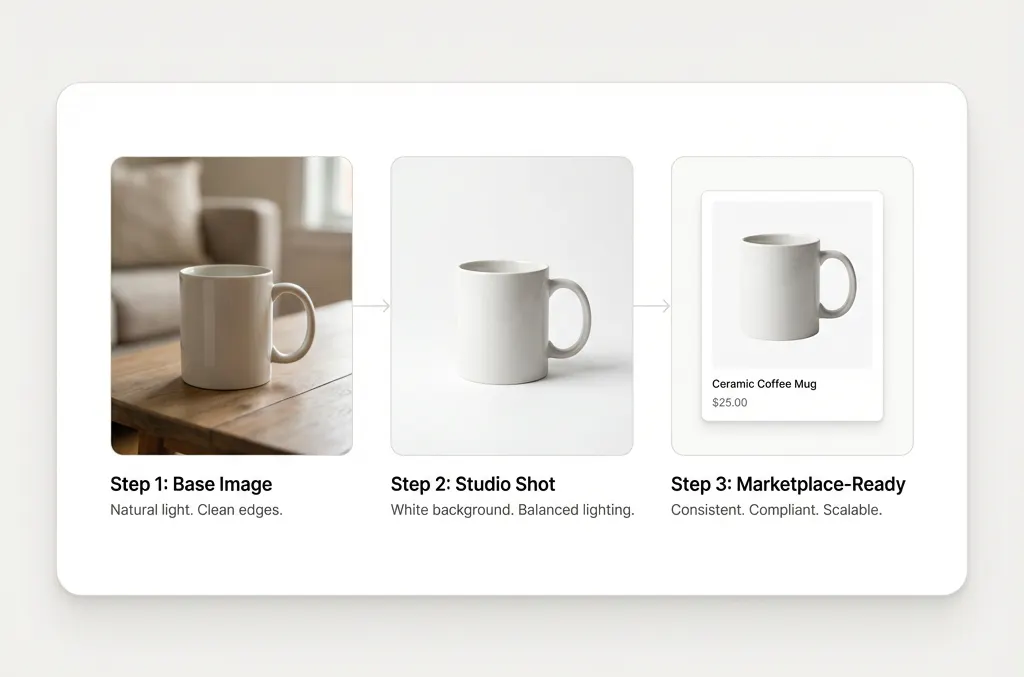
Creating a strong product image does not require a studio setup. All you need is natural daylight near a window, a neutral surface such as a table, wall, or cloth, and a phone camera. Shoot during the day, avoid harsh shadows, keep the product fully visible, and frame it straight-on rather than at an angle. The background does not need to be perfect at this stage; what matters is that the product edges are clean and clearly defined.
Step 2: Use Studio Shot to Create a White Background
This is where Studio Shot on Blend comes in. Studio Shot is not designed to fix careless photography; it is built to elevate decent inputs into studio-style outputs. If your image is in focus, has clear product edges, and neutral lighting, Studio Shot can remove the background, create a clean white canvas, balance shadows, and standardise framing—resulting in a listing-ready image without any studio involvement.
Step 3: Make It Marketplace-Ready
White background images are the standard across Amazon listings, marketplace thumbnails, category grids, PDP hero images, and paid ads. Studio Shot outputs are designed to meet platform requirements, maintain colour accuracy, and stay consistent across SKUs. This level of consistency is what builds catalogue trust and improves how products are perceived across every commerce touchpoint.
Common Mistakes That Reduce Image Quality
Even without a studio, it’s possible to make mistakes that hurt the final result. Poor lighting, dark rooms, heavily textured backgrounds, or aggressive colour edits can introduce problems that are hard to fix later. Over-editing is another common issue. White background images should not look stylised or dramatic. They should look neutral and honest.
The best white-background images often seem unremarkable at first glance, and that’s intentional. Their purpose is not to impress with creativity, but to present the product accurately and consistently. When an image appears neutral and honest, it sets appropriate expectations for the buyer and reduces the risk of disappointment after purchase. In e-commerce, clarity almost always outperforms visual drama—because trust is built on accuracy, not aesthetics.
Conclusion
You don’t need a studio to create professional-looking white background listing images. What you need is a clean base photo, a clear process, and the right tool. Studio Shot on Blend is built specifically for this use case—helping brands generate commerce-ready visuals without the cost, time, or dependency of studio setups. If studio access has been your bottleneck, there is no reason to wait anymore. Try Studio Shot in Blend and see how quickly a simple product photo can become a listing-ready image.