
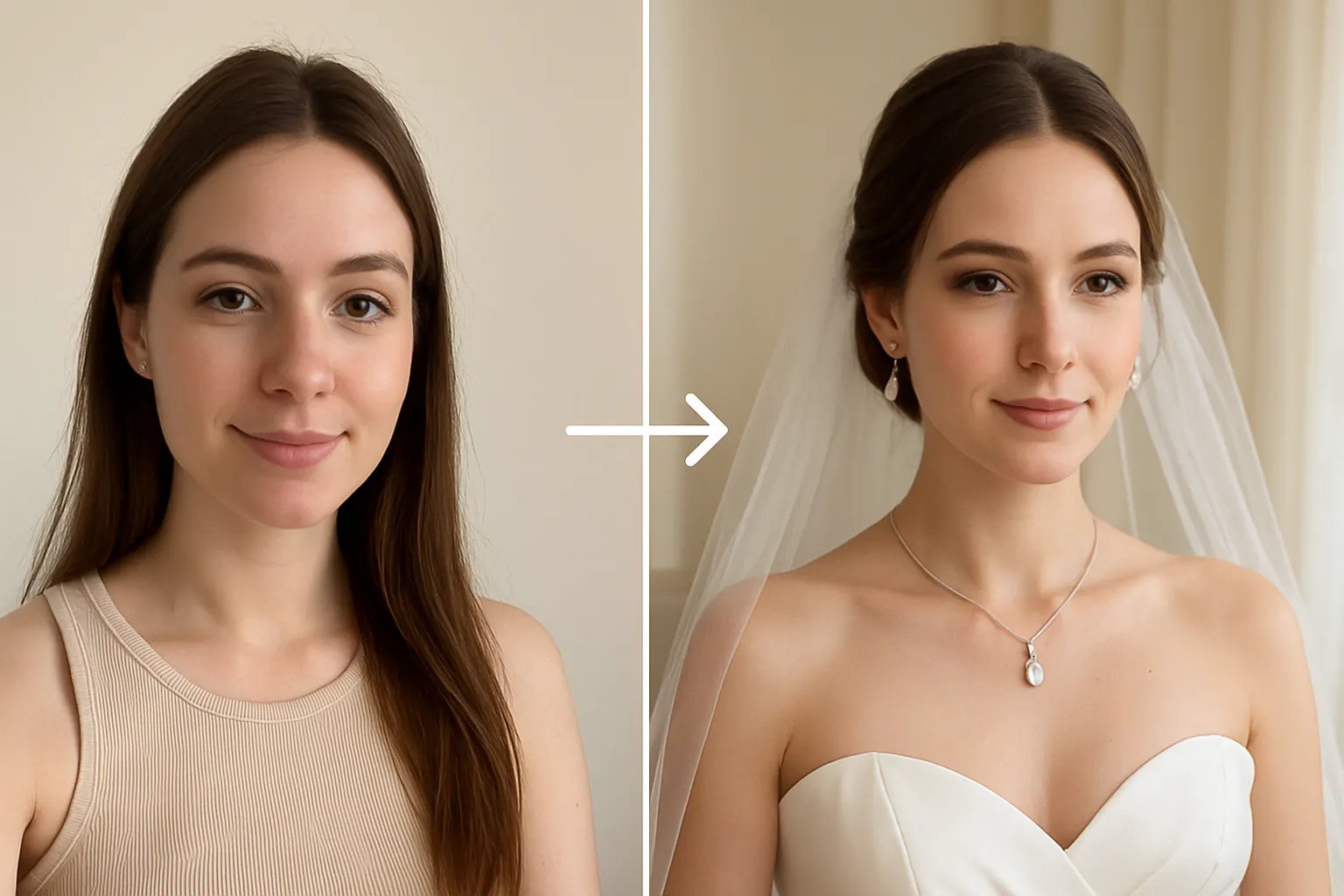
Virtual wedding dress try-on is changing how brides shop for the big day. Instead of booking back-to-back boutique appointments, AI-powered tools let you upload a photo and preview dozens of gowns - plus jewellery and backgrounds - in minutes, all for free. You’ve pinned 300 wedding gowns on Pinterest. Your group chat is blowing up with bridesmaid dress options. And yet, the question lingers:
“Will it actually look good on me?”
Shopping online for wedding outfits and accessories is convenient — but risky. That dream dress can look stunning on the model, and completely different on you. Jewelry? Don’t even get us started. A choker that feels chic in photos can feel overwhelming in real life.
Now, there’s a better way: Try it on before you buy — virtually, on your own photo.
💡 Meet Your Wedding Planning Hack: Virtual Try On
With Blend’s Try On, you can upload your picture and instantly see yourself wearing any bridal gown, bridesmaid dress, or jewelry piece — without stepping into a boutique or waiting for shipping.
- ✅ Upload your photo (or take a quick selfie)
- ✅ Pick your outfit or jewelry
- ✅ Watch the magic — AI creates a photo-real image of you wearing it
No filters, no guesswork, no stress.
👰 Why Brides Love It
- Visualize Your Dream Dress
Compare A-line vs. mermaid vs. ball gown on you, not a model. - Match Jewelry Perfectly
Try earrings, necklaces, and veils with your dress before spending hundreds. - Make Confident Choices
No more “hope it looks good” when you hit add to cart.
👯 Bridesmaids, We’ve Got You Too
Color themes are cute — until you’re scrolling through 47 dresses that all look the same. Try On lets you see which silhouette works for your body before you order. Plus, you can coordinate with the whole squad in minutes.
📱 Perfect for Social Sharing
Turn the planning into fun. Share your looks in your group chat or create an Instagram Story poll:
“Which one for the big day? #TeamMermaid or #TeamAline?”
How to Try On a Wedding Dress with AI on BlendNow (Free)
Trying on a wedding dress virtually takes less than two minutes. Here is how to do it on BlendNow at no cost.
- Upload your photo: Use a clear, well-lit full-body or portrait selfie.
- Choose a dress silhouette: Pick from A-line, mermaid, ball gown, or sheath styles. The AI adapts the dress to your body shape.
- Add jewellery: Select necklaces, earrings, or bangles to layer over the dress on your photo.
- Change the background (optional): Swap your background for a wedding venue or outdoor setting to visualise the full look.
- Compare and save: Generate multiple combinations and screenshot your favourites to share with family or a stylist.
No fitting room, no appointment, no cost. The entire process runs on your phone or browser — upload your selfie and see your bridal look in seconds.
Match Jewellery, Outfit and Background - All in One Virtual Try-On
Wedding styling is not just about the dress. Finding the right jewellery to complement your lehenga, saree, or gown — and choosing a backdrop that ties the look together — can feel just as overwhelming as dress shopping itself. AI virtual try-on tools now let you do all three at once. Upload your photo, select an outfit, add a jewellery set, and choose a background — from a floral mandap to a golden hall — and instantly preview your full bridal look.
This is especially useful for brides who want to:
- Preview how a necklace set looks against a specific neckline;
- Match maang tikka and earrings to a chosen lehenga shade;
- Compare traditional and contemporary jewellery combinations side by side;
- See how different backdrops change the feel of the same outfit.
Try layering a polki choker against a pastel lehenga with a garden backdrop, or test whether a sleek diamond set suits a minimalist white gown — all without booking a single appointment.
✨ Real Brides Are Saying…
“Trying on jewelry virtually saved me from buying a $400 necklace that didn’t work with my neckline.”
— Megan, Dallas
“Our bridesmaid dress drama? Gone. Everyone tried options on their selfies and picked what looked best.”
— Lily, New York
Lily from New York had a fantastic experience trying on wedding dresses virtually. Ready to try it yourself? Try on wedding dresses and jewellery on your photo for free — no appointment needed.
🚀 Ready to Say Yes (to the Dress)?
Before you book appointments or swipe your card, try it on — virtually, on you.
It’s the easiest way to make sure your wedding look is everything you imagined… and more.
Frequently Asked Questions
1. Can I virtually try on a wedding dress for free?
Yes. Blend lets you upload your photo and preview AI-generated wedding dresses with free credits, making it easy to explore different bridal styles.
2. How can I match jewellery with my outfit online?
Upload your photo to Blend, choose your outfit, and try different necklaces, earrings, and other jewellery pieces to find the perfect match.
3. What is a wedding dress filter?
A wedding dress filter uses AI to place a bridal gown onto your photo, creating a realistic preview without needing a physical fitting.
4. How do I put a wedding dress and jewellery on my photo virtually?
Simply upload your photo to Blend, select a wedding dress and matching jewellery, and the AI generates a complete bridal look in seconds.
5. Can AI change the background in my bridal photo?
Yes. Blend can replace your background with wedding-themed or custom scenes while keeping your outfit and jewellery looking natural.
6. What photo works best for an AI wedding dress try-on?
Use a clear, well-lit, front-facing or full-body photo with minimal obstructions for the most realistic results.
7. Can I try on different jewellery styles before downloading my image?
Yes. Blend lets you experiment with multiple jewellery styles so you can compare different looks before saving your favorite.
8. Can I download and share my AI-generated bridal look?
Yes. After generating your bridal look, you can download the image and share it on social media or use it for wedding planning.